1. Open the official Daiso store inventory page.
2. Search for the product by name or item number.
3. Select the exact product.
4. Search for the Daiso store you plan to visit.
5. Check the store’s inventory before traveling.
| What you need | Daiso Korea information |
|---|---|
| Inventory check | Available online 24 hours |
| Best search information | Product name + item number |
| Store inventory | Varies by location |
| Product inquiries | 1522-4400 |
| Phone support | Weekdays 9:00 a.m.–6:00 p.m. |
1. How do I check Daiso Korea inventory online?
The easiest way to check Daiso Korea inventory is to use Daiso’s official store inventory service before visiting a branch.
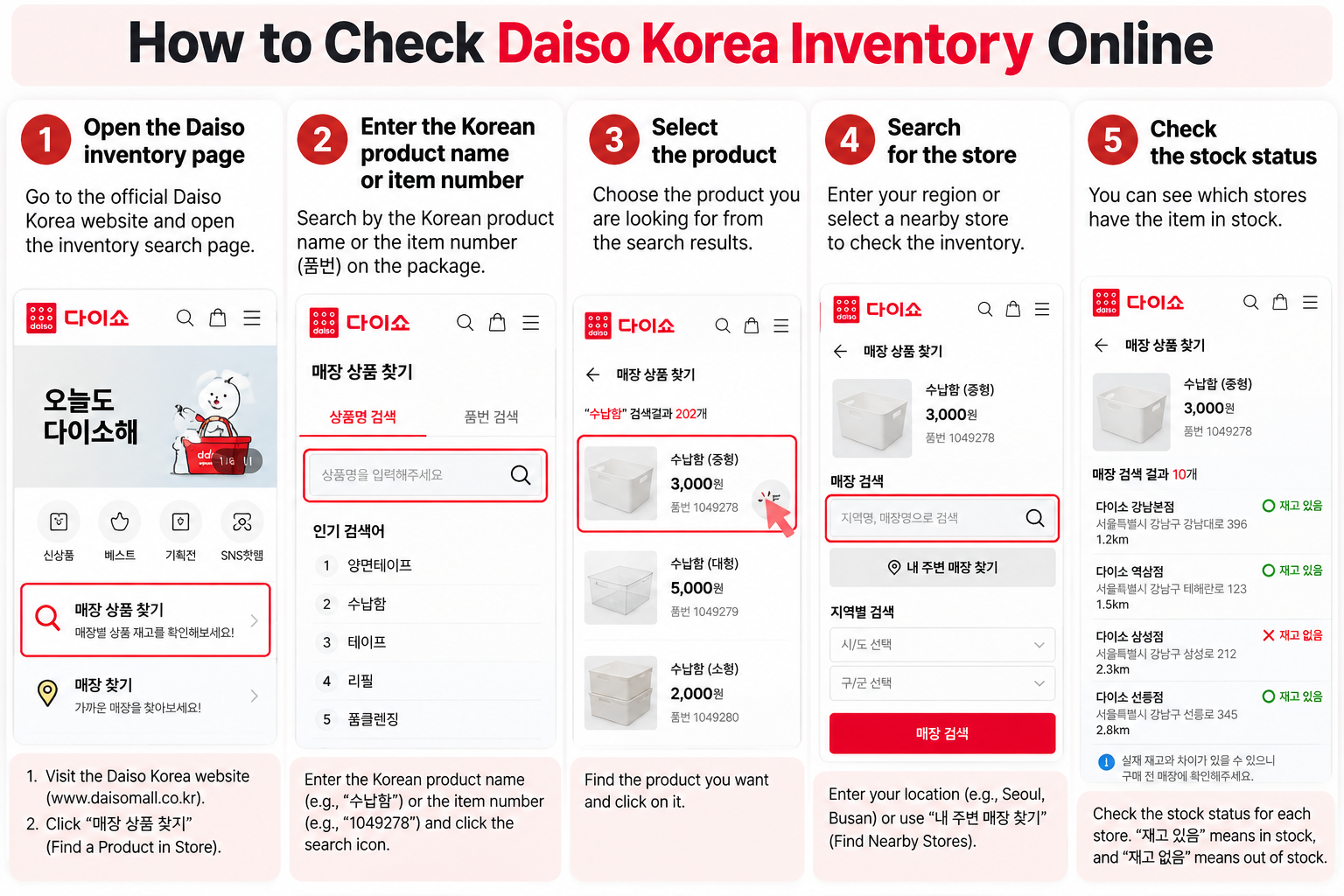
Daiso Korea provides a dedicated store inventory service through its official customer-support system. The company states that store-by-store product inventory information can be viewed online 24 hours a day.
Start by searching for the item you want. Once you find the correct product, select the Daiso location you plan to visit and check whether that branch shows inventory for the item.
This is useful because Daiso stores in Korea do not all carry exactly the same products. A product available at one location may be unavailable at another, so checking the specific branch before traveling can save time.
If possible, copy the product’s Korean name before searching. Searching the exact Korean product name or item number can make it easier to identify the correct item.
2. Can I search Daiso stock by item number?
Yes. Having the exact product name and item number is especially helpful when searching for Daiso products with similar names or designs.
Daiso’s official FAQ recommends checking the product name and item number when trying to locate an item that is unavailable at a particular store.
If you found the product on TikTok, Instagram, YouTube, a Korean blog, or at another Daiso location, try to identify the exact product rather than relying only on its appearance.
After finding the correct item, check more than one nearby branch if necessary. Daiso explains that its stores carry a large assortment and that inventory varies by location.
Product name → exact name if possible
Item number → useful for identifying similar products
Store name → the exact branch you plan to visit
3. How do I find a Daiso store in Korea?
Use Daiso Korea’s official store finder to search by store name or area and confirm the exact branch before visiting.
This is important after checking inventory because multiple Daiso stores may be located in the same city or shopping district. Make sure the store you navigate to is the same branch whose inventory you checked.
The official store finder provides branch information such as the location and operating hours. Some store listings also provide information about available facilities and services.
Daiso’s official FAQ also directs customers looking for nationwide store locations to its store search service or customer support.
4. Can I check Daiso inventory on my phone?
Yes. You can access Daiso Mall on a smartphone, and Daiso also provides an official Daiso Mall mobile app.
Android users can search for “다이소몰” in Google Play, while iPhone users can search for “다이소몰” in the App Store.
This can be particularly convenient for international travelers already in Korea because you can check product and store information from your phone before traveling to another branch.
If you are having trouble entering a Korean product name, copy and paste the Korean product name into the search field instead of translating it into English.
5. What if the Daiso item is sold out?
If an item is sold out at one Daiso store, check nearby branches because inventory is different at each location.
Daiso officially explains that its stores carry a very large number of products and that every location cannot stock exactly the same assortment.
This means a sold-out result at one branch does not necessarily mean the item is unavailable throughout Korea. Search additional locations using the official inventory service and store finder.
If you still cannot find the item, Daiso recommends having the product name and item number ready and contacting its customer support. Daiso states that staff can help identify a nearby store with inventory based on that information.
Phone: 1522-4400
Hours: Weekdays 9:00 a.m.–6:00 p.m.
Useful information: Product name + item number
6. What should I check before visiting Daiso?
Before visiting, confirm the product, current store inventory, exact branch address, and operating hours.
Because Daiso inventory varies by store, it is a good idea to check stock as close to your planned visit as practical rather than relying on an older search result.
Make sure the branch name and address match the store whose inventory you checked. This is especially important in Seoul and other areas where several Daiso locations may be relatively close together.
If the item is difficult to find or you would be making a long trip specifically for one product, consider checking again shortly before leaving or contacting Daiso customer support.
✓ Check the exact product
✓ Save the item number if available
✓ Check the specific store’s inventory
✓ Confirm the branch address
✓ Check the store’s operating hours
Check the tax refund minimum, passport rules and eligible Myeongdong stores.
Daiso Myeongdong Tax Refund Guide →
“Daiso Korea Inventory Check|How to Find Store Stock”에 대한 1개의 생각